Dosimetry on campus and in the hospital system is handled through dosimetry coordinators in charge of a specific subaccount. Overall responsibility of the MU dosimetry program is handled through Radiation Safety at MU Environmental Health and Safety
A dosimeter is a wearable device that records exposure from ionizing radiation over a period of time. It does not protect the user from radiation and can only be read by special equipment. Due to its nature, it is important that the user appropriately wears and stores the dosimeter for an accurate exposure record. At Mizzou, we use dosimeters in two variations: badge (Pa) or ring (S). Depending on the subaccount, a badge dosimeter is worn either at the collar or at the chest.
Frequency
Dosimeters are exchanged either monthly or quarterly. This is referred to as the subaccount’s or dosimeter’s frequency. The frequency dictates the period during which a dosimeter is worn and when it is returned to EHS to be sent for dose processing.
| Frequency | Wear Period | Return Before |
| Monthly | Calendar month Example: January 1 to 31 | The 15th following the end of the wear period. Example: February 15 |
| Quarterly | Q1: Jan 1 – Mar 31 Q2: Apr 1 – Jun 30 Q3: Jul 1 – Sep 30 Q4: Oct 1 – Dec 31 | The 15th following the end of the wear period. Example: A Q1 dosimeter must be returned by April 15 |
Badges
Badge dosimeters are the primary type used for measuring doses. They can be worn either at the collar or chest. In order for the badge to be processed correctly, the user must make sure to snap off the "Remove" tab at the top of every new dosimeter they receive.

Rings
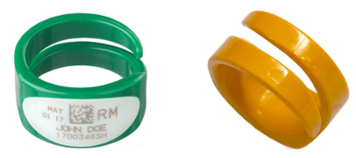
There are three sizes available: small, medium/large, and extra-large. The dosimetry application includes a section to select a ring size. If no ring size is selected, size medium/large will be issued as default. The rings are made to be flexible and can be shaped to better fit the wearer. The rings use thermoluminescent dosimeter (TLD) technology and are heat sensitive. They should always be worn on the user’s dominant hand, i.e. the hand most likely to be exposed to radiation.
Spare Dosimeters
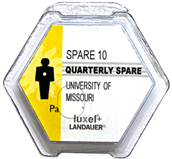
Spare dosimeters may be issued so that the applicant can begin to wear a dosimeter immediately. They are easily identifiable by the “SPARE” labeling on the front and will typically only be active for the period for which it was issued. Spares may have indicators that do not apply to your subaccount, such as the “wear at chest” graphic. Be sure to follow the standards prescribed to your subaccount.
Area Dosimeters
Area dosimeters look identical to badges but are labeled to be distinguishable. Area dosimeters are used in areas where additional dose from sources of ionizing radiation may be of concern.
The dosimetry program is largely managed via EHSA and therefore requires participants to have an EHSA account. Dosimetry coordinators can facilitate this process by pre-registering incoming staff.
Quick links:
Filling out a dosimetry application
Filling out a declaration of pregnancy
Reviewing a dosimetry application
Pre-registering Users on EHSA
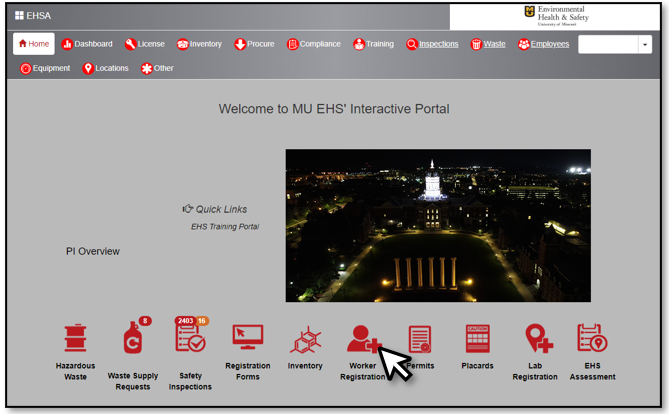
In the homepage, click on Worker Registration
Click on + Add New Worker
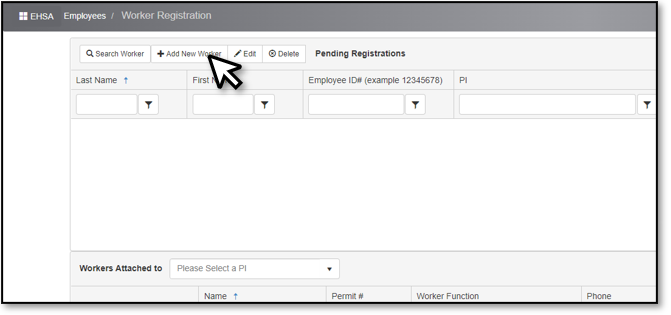
Under the Worker Information window, complete the following fields at minimum: Employee ID#, Pawprint, First Name, Last Name, and Email.
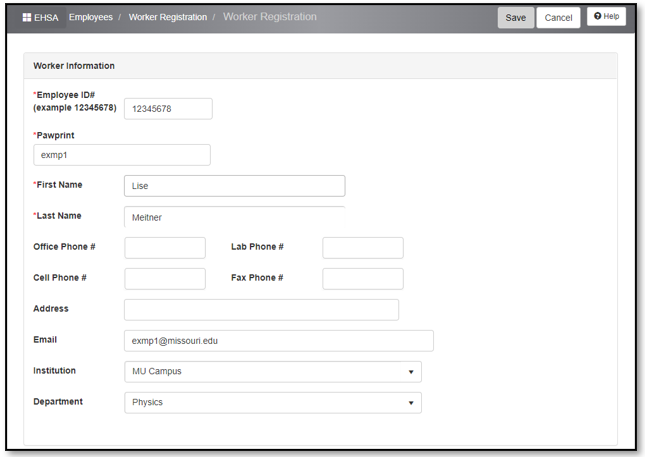
- Below the Worker Information is the Worker Link table. Always select the following:
- PI: Radiation Safety, Training
- If the worker will be working with radioactive materials, select Permit: R-00180 (RAM)
- If the worker will be working with radiation generating machines (e.g. radiographers), select Permit: X-00021 (XRAY)
- To select the appropriate Worker Function, refer to the below table:
Worker Function Description Radiation Worker - Nuc Med, DOT, IATA, Rb MUHC Nuclear Medicine at UH and CMC Radiation Worker - Nuc Med, DOT, IATA MUHC Nuclear Medicine at CRMC Radiation Worker - Medical (brachy, micro,
physicians, nurses, NM students)MUHC Radiation Oncology, Radiology, Interventional
Radiology (Y-90 AUs)Radiation Worker - Research-dosimetry Mizzou personnel that use radioactive materials Radiation Worker - Vet Med College of Veterinary Medicine & Veterinary Health Center personnel X-Ray Worker - Campus Mizzou personnel that use ionizing radiation X-Ray Worker - Hospital, Fluoro MUHC personnel that frequently work around fluoroscopy
procedures (e.g. C-Arm).X-Ray Worker - Hospital, General MUHC personnel that frequently work around ionizing radiation 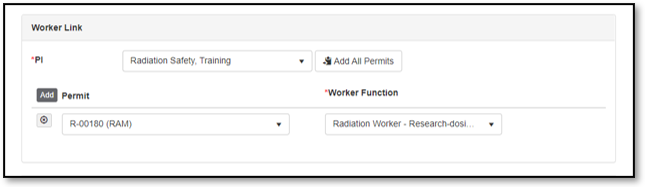
- Press the gray Save button in the bottom left corner or upper right corner of the form.
- EHS will process the worker registration in 1-2 business days. You and the worker you are registering should receive an email confirming this.
Training
All workers applying for a dosimeter must complete a radiation safety training curriculum applicable to their duties. At minimum, each worker must complete the Dosimetry Training prior to applying for a dosimeter. Accessing training portals are different for Mizzou and MUHC personnel:
- For MUHC personnel:
- Log-in to Cornerstone (formerly SABA)
- For Mizzou personnel:
- Log-in to EHSA
How Dosimetry Applications are Completed
Reference below to learn how to access and submit a dosimetry application.
- To begin...
- Click here for a shortcut to the form and log-in to EHSA or
Log-in to EHSA and click on EHS Assessment. Click on + Browse New Forms at the top left corner to open the Assessment Form window. Browse for the Dosimetry Application form under Radioactive Material Use Forms.

- The first tab of the application summarizes the prerequisites that must be completed prior to application and provides a link to a video tutorial on how to complete the application as well.
- The comment box may be used to provide specific information such as dosimeter wear period for temporary workers. Future deactivation dates can only be set within 6 months of the dosimeter wear date.
Click on the next tab, Assessment Questions, to complete the form. Be sure to complete all fields.

The form will expand and ask for the Dosimetry Coordinator and Subaccount Code. Dosimetry coordinators are listed by their last name then first name (e.g. Doe, Jane). Subaccount codes are typically comprised of two or three letters (e.g. CT, ATT, RYX, …).
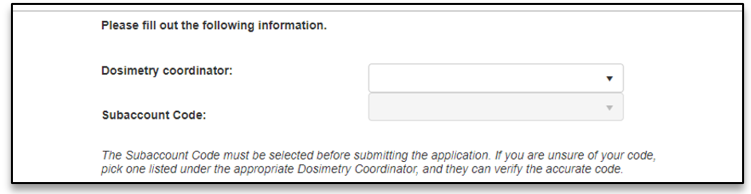
- To submit the application, apply your e-signature by clicking on the green Sign button and press Save as Complete.
Reviewing Dosimetry Applications as the Dosimetry Coordinator
When a worker submits a dosimetry application under your subaccount code, you will get an automatic email notification informing you to review the application.
The review a dosimetry application:
Click the link provided in the email. This will take you directly to the worker's application.
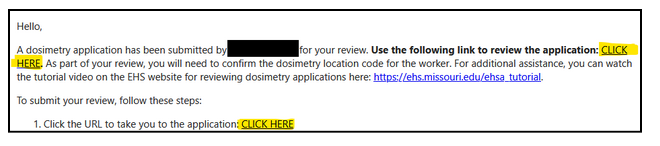
- Log into EHSA with your MU pawprint and password.
Click "Assessment Tab".
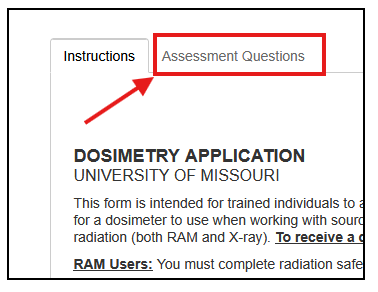
- Review the contents of the application.
Verify that the correct subaccount is listed for the worker. This is important for dosimetry coordinators in charge of multiple subaccounts.
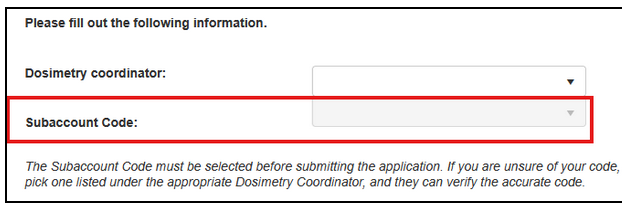
Once reviewed, scroll down to the red reviewer section.
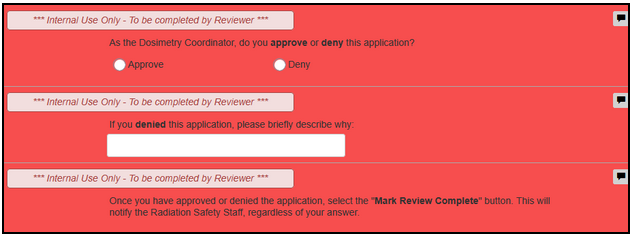
- Click "Approve" if you approve, or "Deny" if you deny the application.
- If you deny the application, please include an explanation of why in the provided field.
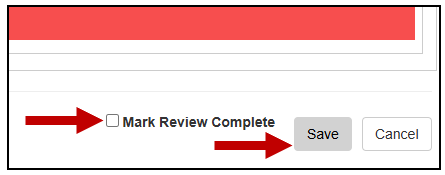
Click "Mark Review Complete", then "Save".
- The health physicist in charge of dosimetry will then review the application and either assign spare dosimetry or order a special shipment from Landauer. Both you and the worker will receive an email notification when the application is approved by a health physicist.
- Dosimetry typically arrives between 3-10 days after approval. If you need spare dosimetry sooner, please reach out to Radiation Safety at rad@missouri.edu or (573) 882-0737.
Submitting a Declaration of Pregnancy: Fetal Monitoring
- To begin...
- Click here for a shortcut to the form and log-in to EHSA or
Log-in to EHSA and click on EHS Assessment. Click on + Browse New Forms at the top left corner to open the Assessment Form window. Browse for the Declaration of Pregnancy form under Radioactive Material Use Forms.
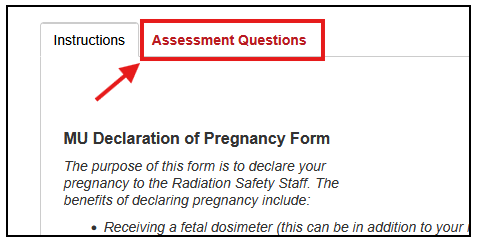
The first page will have additional information you may review and a Comment section. Click on the Assessment Questions tab to begin completing the form.
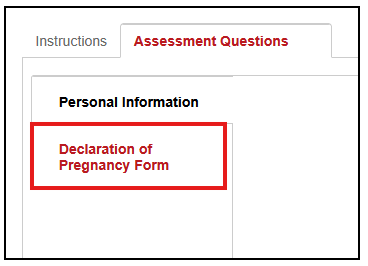
- Your name and e-mail should be automatically filled under the Personal Information tab. If not, please complete those fields.
Click on the Declaration of Pregnancy Form tab and read each section carefully. Be sure to complete each field marked with a red arrow.
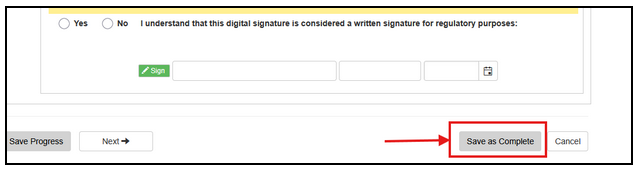
To submit the form, press the Save as Complete button at the very top or bottom of the form on the right side. If you have any questions about this process, please contact the Radiation Safety Officer at Environmental Health & Safety.
Bulk Dosimeters
If you need to order a large number of dosimeters (>10), email rad@missouri.edu to obtain a copy of a spreadsheet which can be used to place large orders with the dosimetry provider. The following information will need to be submitted, and the file will be denied if not complete:
- Subaccount code
- First Name
- Last Name
- Start Date (typically coincides with the first day of the month or the quarter depending on the frequency)
- Frequency (quarterly or monthly)
- Date of birth
- Employee ID
How Are Dosimeters Delivered?
Dosimeters are delivered to the Dosimetry Coordinator either directly from Landauer or through Campus Mail. Dosimeters will be packaged in either a white envelope or grey plastic packets.
How Are Dosimeters Returned?
- Dosimeters must be returned no later than (15) days following the end of the wear period.
Before returning, dosimeters need to be detached from the silver clip-on holders. If you have a surplus of the clip-on holders, you may return them as well. If you have a used dosimeter that did not use the holder (e.g. an area dosimeter), be sure to tear off the “REMOVE” plastic tab on the top edge of the dosimeter to ensure it is properly processed.
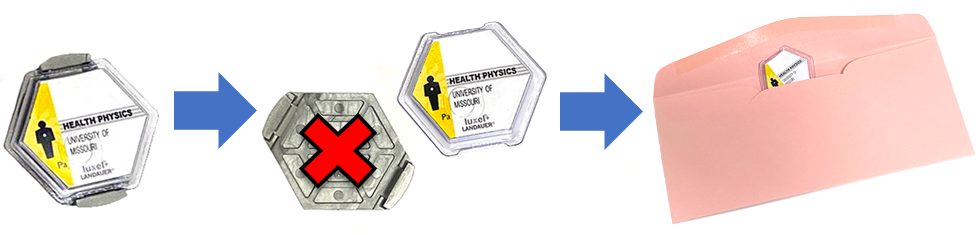
- Dosimeters can be directly placed in a mailing packet if they are being mailed for return.
- Return methods:
- Mail to EHS Radiation Safety through Campus Mail.
Mail Address: 180 General Services Building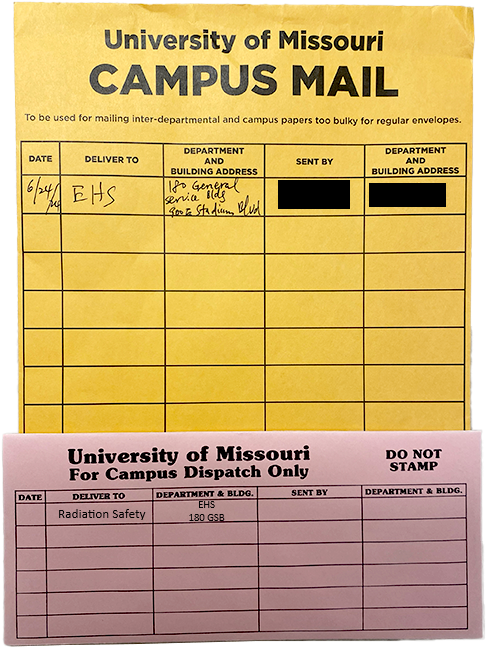
- Dosimeter drop-box located in the University Hospital, Department of Radiology.
Location: N214 by the Purple elevators towards the Medical Science Building.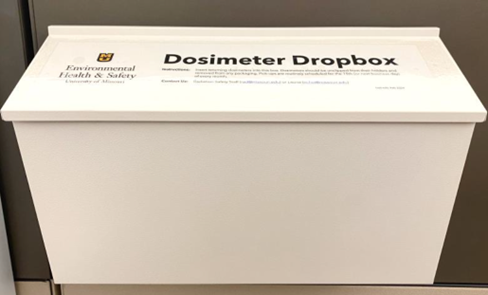
- Physical drop off. Please ask for EHS Radiation Safety at the receptionist desk.
Street Address: 900 E Stadium Blvd, Columbia, MO 65211
- Mail to EHS Radiation Safety through Campus Mail.
What if a dosimeter is damaged or lost?
You may request a replacement dosimeter by contacting us with the subaccount and participant's name. Lost dosimeters will incur late and lost fees if not returned within 2 months following the end of the wear period.
How do you make changes? E.g. deactivating a dosimeter and transferring to a different subaccount
Requests can be sent to rad@missouri.edu or an established point-of-contact in Radiation Safety. To better assist you, be sure to include the keyword "dosimetry" in the subject or body of the email.
- Deactivate a dosimeter: Email deactivation or cancellation requests with the participant's full name and subaccount. All charges for dosimeters cancelled after Landauer's production deadline will be the responsibility of the subaccount. The production deadline is generally (40) days before the start of the wear period. You may also establish a deactivation date for a dosimeter up to 6 months in advance.
- Transfer a dosimeter user to a different subaccount: Email the request with the participant's full name, their current subaccount, and the new subaccount they are moving to. Transfers imply that their current dosimeter will be deactivated.
How to obtain a dose report if you are...
The dosimetry coordinator or other appointed individual*
- Click here for a shortcut to the form and log-in to EHSA or
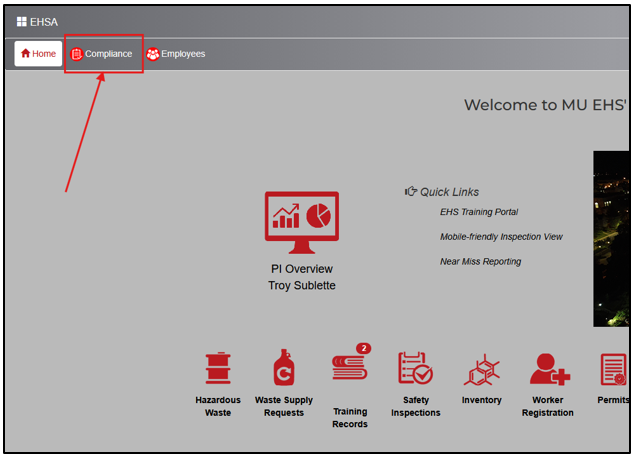
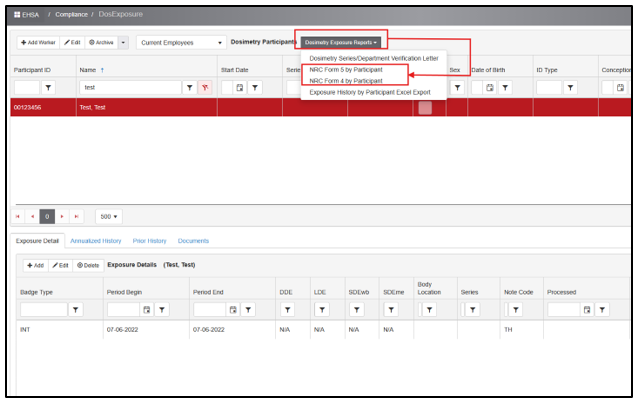
Log-in to EHSA and click on Compliance on the top menu bar.
Under Dosimetry, click on Exposure Histories.
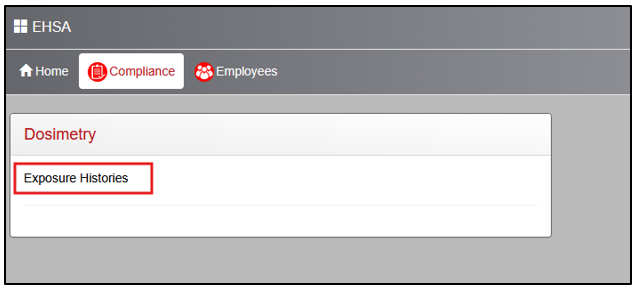
- In the top window, you can search for a specific employee. You must then select (red highlight) their name by clicking on it once to populate the details on the bottom window.
Click on the "Dosimetry Exposure Reports" button and select either "NRC Form 5 by Participant" (yearly dose) or "NRC Form 4 by Participant" (lifetime dose) to print a report of the employee's exposure history. For Form 5, a popup screen will appear asking you to input a year.
For a radiation worker to access their dose history on their own, here is a guide: Access NRC Form 5 and Exposure History webpage.
ALARA Notifications and Investigations
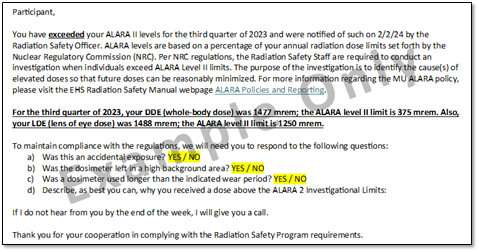
The ALARA program sets personnel dose levels well below the annual regulatory limits defined by the NRC. Persons who receive a dose greater than Level 1 but less than Level 2 will receive a notification to inform them of their elevated dose. Persons who receive a dose exceeding Level 2 will trigger an investigation by the ARSO. The investigated will receive a notification requesting additional information to determine the cause of the dose and assess methods for dose reduction.
For more information, here is a link to our Radiation Safety Manual outlining ALARA policies and reporting.
Dose History Requests
Dose history requests can be forwarded to Radiation Safety digitally or physically. Please send them to rad@missouri.edu or forward through Campus Mail to 180 General Services Building.